Tuesday, September 28, 2010

Office for Mac 2011 Resembles Windows Office 2010

Pre-orders for Office for Mac 2011 have started, and Microsoft will release the software next month. Office for Mac largely resembles Windows Office 2010 with a full-screen view in Word and a Dynamic Reorder feature for layers. Multiple e-mail accounts can be viewed in Outlook, and Office for Mac is reportedly compatible with Windows Office 2011.

Office for Mac 2011 will be launched on Oct. 26, Microsoft announced on Tuesday. The launch date had been rumored for several weeks, and pre-orders begin now.

This is the first major revision for the Mac office suite since early 2008, and the productivity Relevant Products/Services package has been retooled to largely resemble Windows Office 2010. Some of the new features include a full-screen view in Word and a Dynamic Reorder feature that allows layers in a document or presentation to be moved around.

'Almost Forget You're in Word'

In a video posted on Microsoft's Mactopia site, Mac Senior Evangelist Kurt Schmucker said something users will "notice right away in Office 2011 is the launch speed of each of the apps." He also pointed to improvements in charting, which he said is much faster in the new Excel. Schmucker recalled that one tester described the new Word and Excel as "light because they are so much faster."

Full Screen actually offers two views -- one designed for writing, and one for reading. When in the full-screen view for writing, the user interface disappears. A formatting toolbar appears when the mouse is moved to the top of the screen. In the same video on Mactopia, Senior User Experience Manager Han-Yi Shaw said that, when a user is in this view, you "almost forget you're in Word because all you see is the page."

Shaw said the company has "long had this idea to, in one swoop, dynamically reorder all the layers in a presentation or document." He described Dynamic Reorder as "exciting" and "futuristic," helping to make a Word document or a presentation "enjoyable and intuitive at the same time."

Free Upgrade from Office 2008

Other new features include a view of multiple e-mail accounts within Outlook, access to Microsoft's SkyDrive file-sharing service, and reportedly complete compatibility with Windows Office 2011. Visual Basic for Applications macros is back, which will please fans of that automation tool, but, according to some reports, Outlook won't sync with Exchange 2003 or earlier versions, and there's no synchronization with Mac's iCal.

For collaborative work, a document can be stored on SkyDrive or a SharePoint server Relevant Products/Services and edited or written to by multiple users, whether on Mac or Windows machines.

Office 2011 includes Word, Excel and PowerPoint in the Home and Student editions, plus Outlook in the Home and Business edition. Home and Student will cost $119.99 for a single license and $149.99 for three licenses. Home and Business will be priced at $199.99 and $279.99 for one and two licenses, respectively.

In general, upgrades will not be allowed, just as they are not for Windows Office 2011. However, purchasers of the current Office 2008 can get a free upgrade Relevant Products/Services to 2011, an offer that began in August and will continue to Nov. 30. A reduced-rate academic version will also be available.
Read more...

Monday, September 27, 2010

Context-aware Computing, Intel Paints the Future of Devices


Traditionally a large focus of IDF is looking at future computing trends. For the longest time the name of the game was convergence. The shift to mobility highlighted many IDF keynotes in years past. Today, in Intel's final keynote of the show, Justin Rattner began by talking about context-aware computing.

The first demo was the most compelling - an application called the personal vacation assistant.

The personal vacation assistant takes information your device already knows about you. Things like your calendar, current GPS location as well as personal preferences for things like food.

The app then takes this data and can provide you with suggestions of things to do while you're on vacation. Based on your current GPS coordinates and personal preferences, the app can automatically suggest nearby restaurants for you. It can also make recommendations on touristy things to do in the area, again based on your location.

The personal vacation assistant has an autoblog feature. It can automatically blog your location as you move around, post photos as you take them, and even provide links to all of the places you've visited. Obviously there are tons of privacy issues here but the concept is cool.

The idea is within the next few years, all devices will support this sort of context aware computing. While the personal vacation assistant shows location aware computing, there are other vectors to innovate upon. Your device (laptop, smartphone, tablet) can look at other factors like who you're with or what you're doing. Your smartphone could detect a nearby contact, look at both of your personal preferences and make dining/activity recommendations based on that information.

Modern smartphones already have hardware to detect movement (e.g. accelerometer), the next step is using that to figure out what the user is doing. This could apply to things like detecting when you're running, figuring out that you may be hungry afterwards and have your phone supply you with food recommendations next.

Motion sensors in a smartphone could also detect things like whether or not the user has fallen and automatically contact people (or emergency services) in the address book.

Context-aware computing can also apply to dumb devices like remote controls. In his next demo, Justin Rattner showed a TV remote control that made show/channel recommendations based on who is holding it.

The remote control determined who the user is by the manner in which the person held it.

This all depends on having a ton of sensors available and combining it with compute power. Intel was also careful to point out that context-aware computing must be married to security policies to avoid this very-personal information from automatically being shared with just anyone.

Personally I want my smartphone, notebook and desktop to work for me a little more autonomously. Intel talked about the idea that your phone could make a recommendation for what you should eat at a restaurant based on your level of activity for the day and the restaurant's online menu (determined by your GPS location and an automatic web search). Obviously this depends on nutritional information being shared in a uniform format by the restaurant itself, but the upside is pretty neat.

Hard sensing is important (location, physical attributes) but combining that with soft sensing (current running applications, calendar entries, etc...) is key to making context-aware computing work as best as possible.

Context-aware computing feels a lot like the promises of CE/PC convergence from several years ago. I do believe it will happen, and our devices will become much more aware of what we're doing, but I suspect that it'll be a several years before we start seeing it as commonplace as convergence is today.

Justin Rattner ended the keynote with a look into the next 5 - 10 years of computing. Intel is working with CMU researchers on sensing brain waves. Feeding the results of those types of sensors into computing devices can enable a completely new level of context aware computing. That's the holy grail after all, if your smartphone, PC, or other computing device is not only aware of your external context but what you're thinking.


Read more...

Ocosmos OCS1: Oak Trail Gaming Tablet Impressions


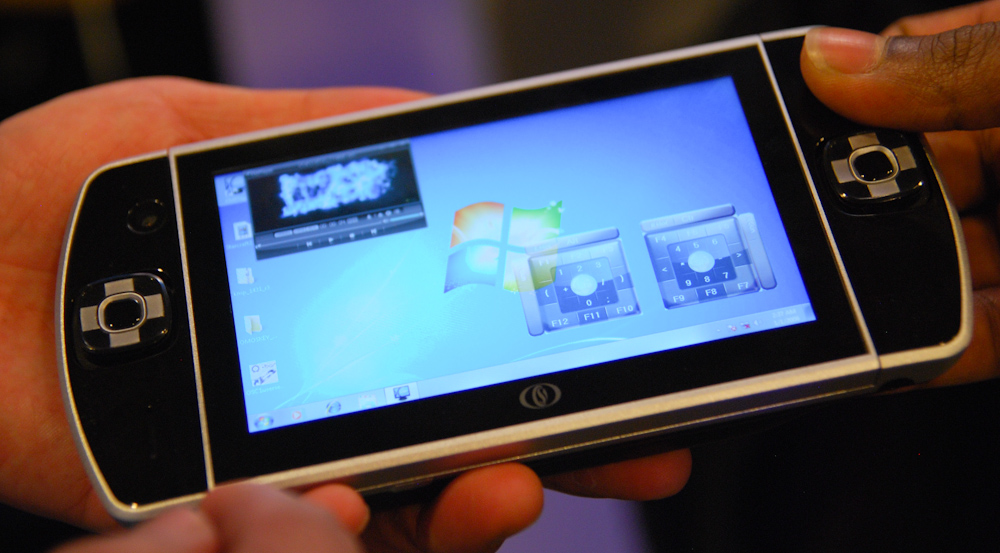
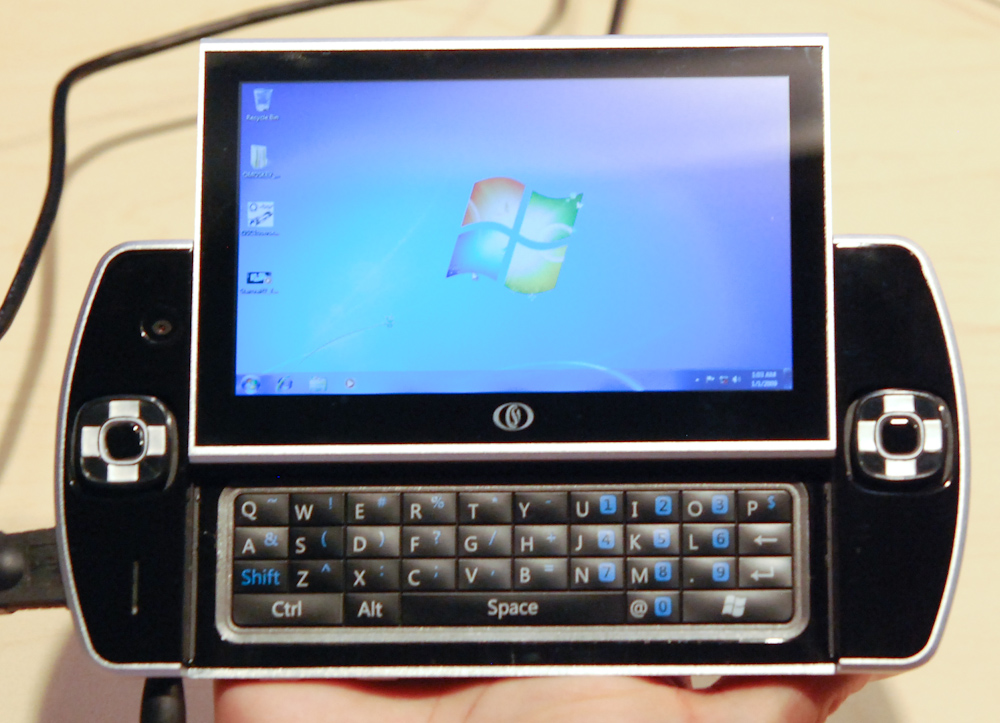
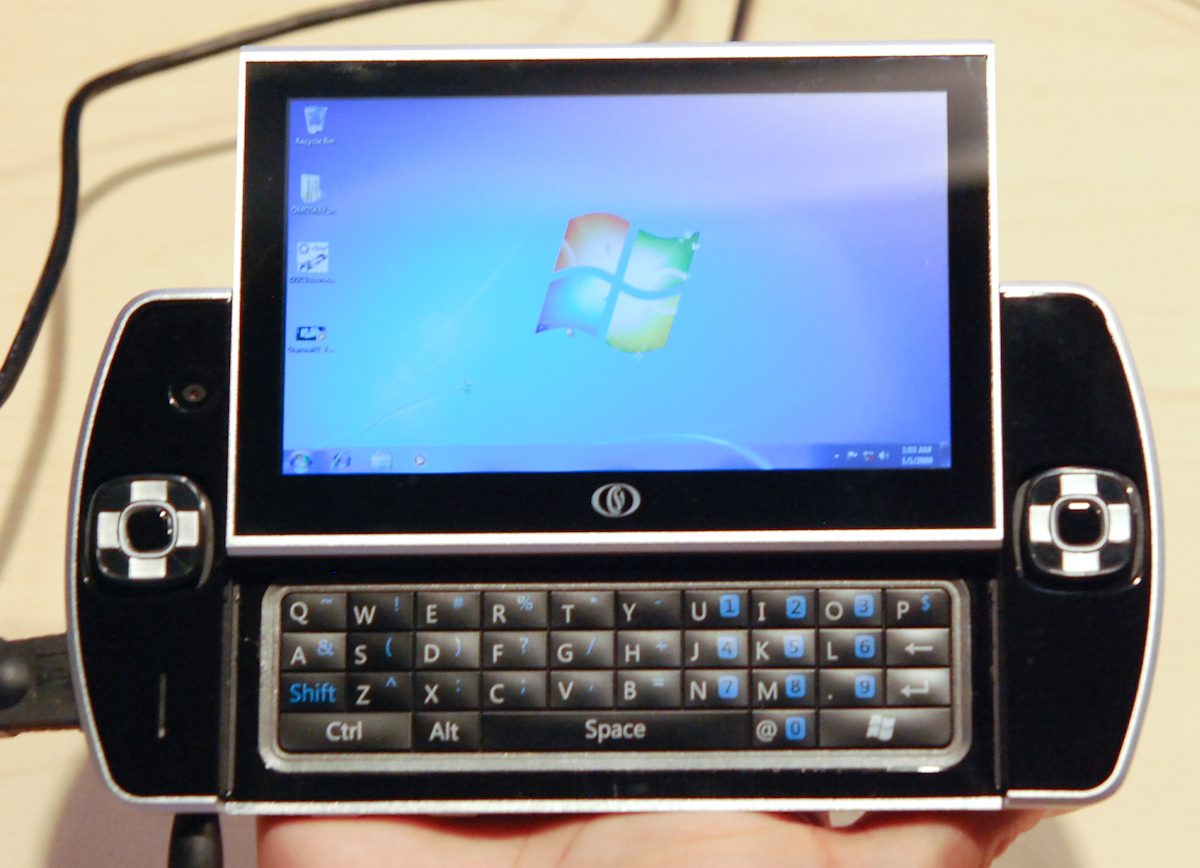
We managed to catch up with Ocosmos, the people behind the OCS1 gaming tablet from Douglas Davis’ keynote this morning, and got some more information regarding the intruiging new tablet. As we noted before, it’s running Windows 7, Intel’s Oak Trail platform, two D-pads, and a screen that slides up to reveal a physical keyboard.

We can now flesh out the specs further, with the data sheet showing a 4.8” capacitive touch screen with WSVGA resolution (248 pixels per inch!), a 1.5GHz Atom Oak Trail with GMA 600, a 32GB SSD built in with expandable memory, integrated GPS, a 1.3 megapixel front facing camera, 3 megapixel rear camera, and a micro-HDMI support.

But the best part about it, other than the awesome form factor and specs for such a small device, is the gaming aspect. The D-pads slide and click in eight directions, can be used and pressed down like analog sticks, and act as the mouse throughout Windows. There are right and left triggers on the top of the device. It’s like a PSP computer, with a real keyboard.

It’s got a pretty hefty feel, which is expected since it’s stuffed an entire Windows system into a 4.8” device form factor, and it fits nicely in your hand. The rear of the device is shaped such that the device is easy to hold when gaming and won’t tire out one’s hands. Unfortunately, due to the early Oak Trail silicon, the prototype was a barely functioning unit that made for a good industrial design/mechanical engineering sample, but things like the touchscreen and d-pads were not working. So the Ocosmos team has a bit of work ahead of them, but the OCS1 isn’t slated to ship until early next year, and we eagerly await the day we can get our hands on a finished product.


Read more...

Cisco Launches New Small-Business Products


New small-business products from Cisco Systems include switches for creating a small-business network, new IP phones, and video-monitoring equipment and software. Cisco's Small Business 300 Series Managed Switches are optimized for energy efficiency. The new SPA 300 Series of IP phones from Cisco and new video systems are versatile.

Cisco Relevant Products/Services Systems is launching new products and services for small businesses. The offerings from the San Jose, Calif.-based company include switches for creating a small-business network Relevant Products/Services, new IP phones, and video-monitoring equipment and software.

In all, eight new products or technologies are being launched, with the Small Business 300 Series Managed Switches being one of the centerpieces. The switches offer network traffic control with such features as quality of service, Layer 3 static routing, and support for IPv6. Browser-based tools are used for setup and management Relevant Products/Services, and the company said the switches are optimized for energy efficiency.

Video, IP Phones

Also being released are the new SPA 300 Series of IP phones, entry-level devices that can be connected directly to an Internet telephone service provider, an IP PBX system, or an IP Centrex system. HD voice, or wide-band audio, is available on all of the phones, and the devices are supported with the Cisco Unified Communications 500 Series and SPA9000 Voice System.

The SPA 525G2 IP Phone is a full-featured, wireless Relevant Products/Services IP device and features Mobile Link. Mobile Link allows calls and contact lists to be transferred back and forth with a mobile Relevant Products/Services phone. The 525G2 is Bluetooth-enabled and has a USB port for charging a mobile phone.

A new desktop Relevant Products/Services administration Relevant Products/Services tool, Office Manager, allows a small-business administrator or an IT Relevant Products/Services person to manage the Cisco Smart Business Communications System.

On the video-monitoring front, the company is offering three new products. The Advanced Video Monitoring System software provides monitoring and control, with analytics Relevant Products/Services, for surveillance departments with up to 64 cameras. The system supports such features as motion detection, alerts if items change, and integration Relevant Products/Services of video cameras with point-of-sale equipment.

The new VC 220 Dome IP Video Camera is designed for both bright and low lighting conditions, and the VC 240 Bullet IP Video Camera is weatherproofed for outdoor installation.

'Three Buckets'

Accompanying the new products is an expansion of the company's Small Business Support Service, which is now available for the new products. The support includes next-business-day hardware replacement, software updates, access to the Cisco Support Center and community, and online chat support.

The new products are the latest in Cisco's efforts to market to the small and midsize business community. David Tucker, vice president and general manager of the Cisco Small Business Technology Group, recently told news media that his company's small-business strategy is geared to "three buckets -- connect, secure Relevant Products/Services and communicate." The first includes switching, routing and wireless; the second covers network security and surveillance; and "communicate" encompasses collaboration technologies.

In June, the company launched its Small Business NSS 300 Series Smart Storage, desktop network-storage solutions with integrated business apps. The products, designed specifically for companies with less than 100 employees, come in two-bay, four-bay and six-bay high-performance Relevant Products/Services storage units, with up to 12 terabytes of capacity.
Read more...

Sunday, September 26, 2010

Intel announces Tunnel Creek - Atom E600 System on Chip


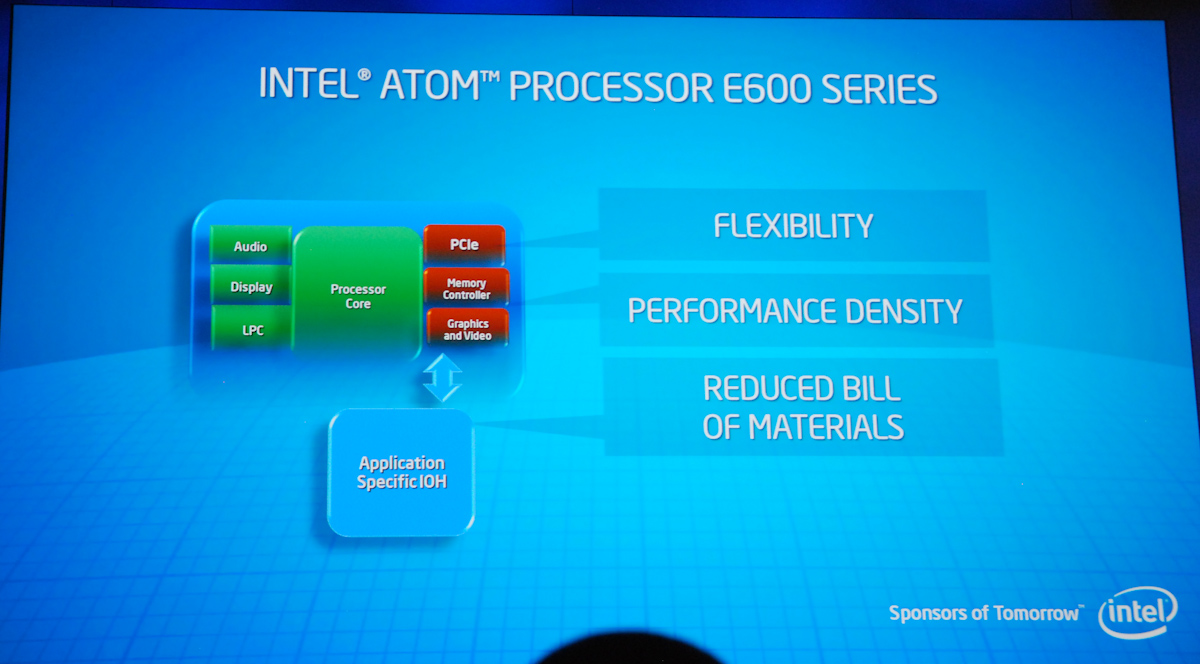
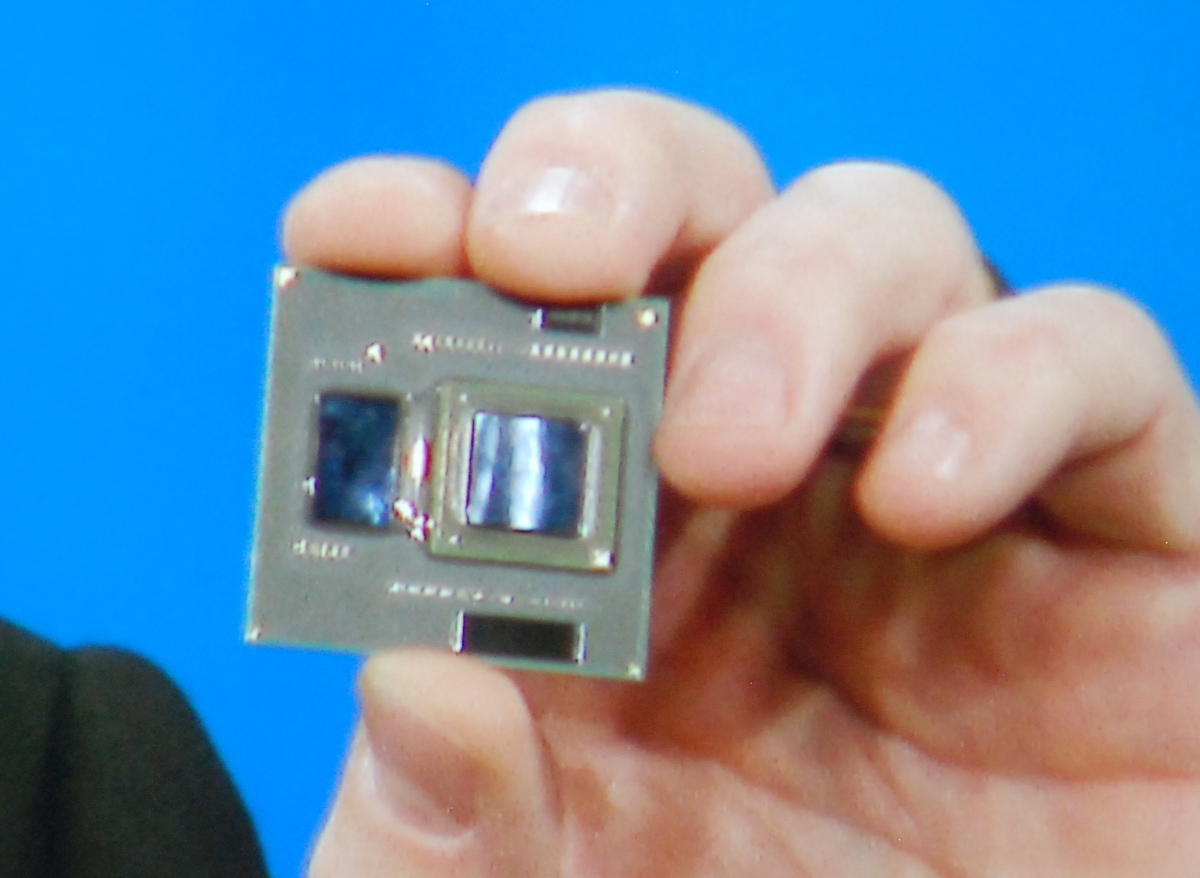
At the end of this morning's keynote at IDF 2010, Intel announced the Atom Processor E600 series. It's a Moorestown-like SoC designed for embedded applications.

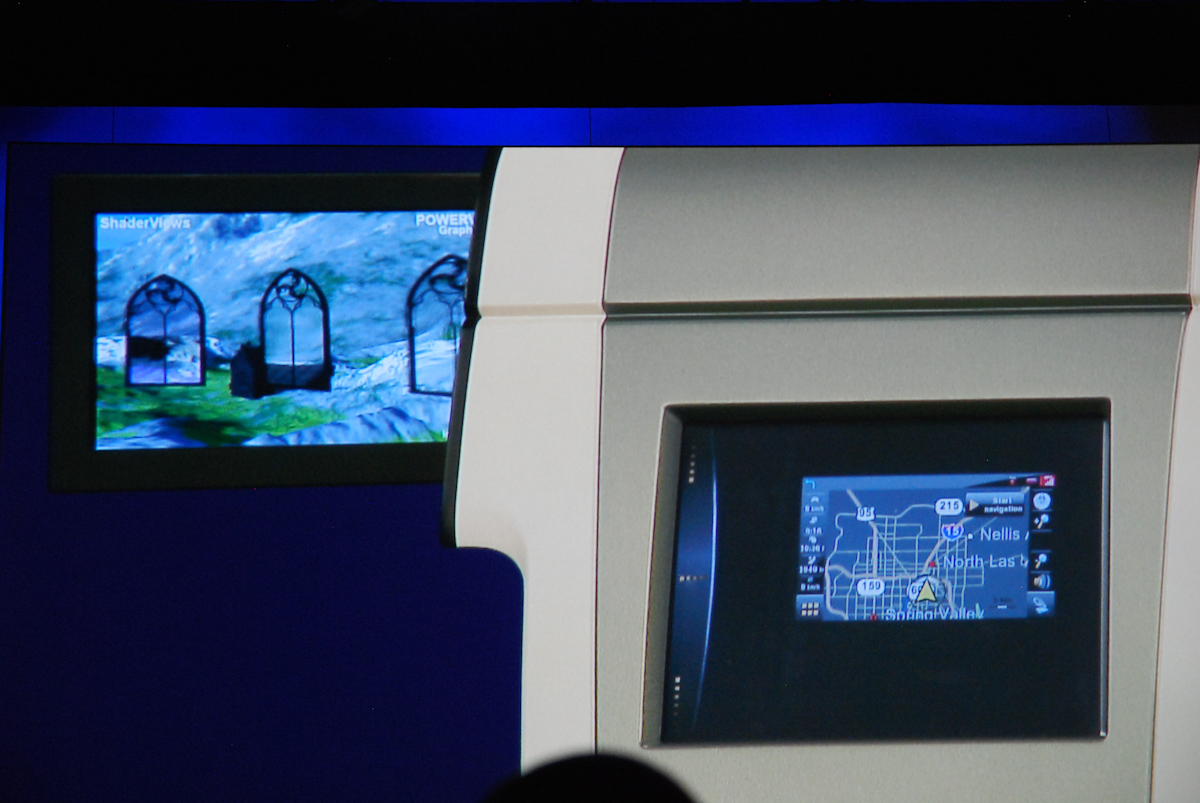
Intel is really targeting this SoC at the consumer electronics industry and a variety of applications that could benefit from both better integration. Demonstrations included an E600 SoC powering a car navigation system and a variety of dynamic 3D content or video on a separate passenger entertainment display. You can see it running a PowerVR graphics demo if you look closely in the photo below.

E600 brings everything onboard for the platform, including PCI-E for using the E600 in a multitude of different capacities. Either bring your own PCH or build one yourself - Intel already showed examples of Realtek, OKI, and ST Microelectronics on stage. If you're just building a desktop, Intel has a fairly standard platform controller hub called the EG20T for control like ethernet, SATA and USB. Intel really hopes that their embedded Atom platform will bring cost of system integration way down.

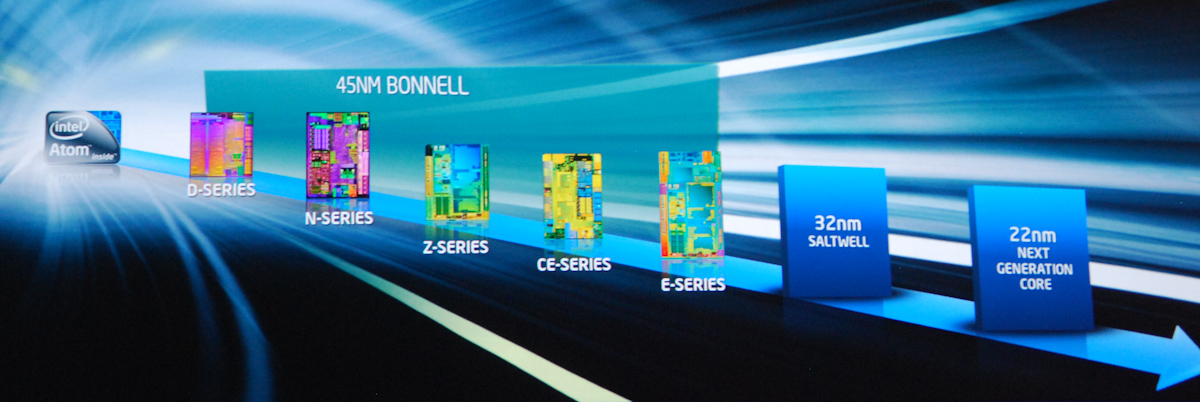
The E-series is a 45 nm part, 32nm and 22nm Atom series parts will follow.

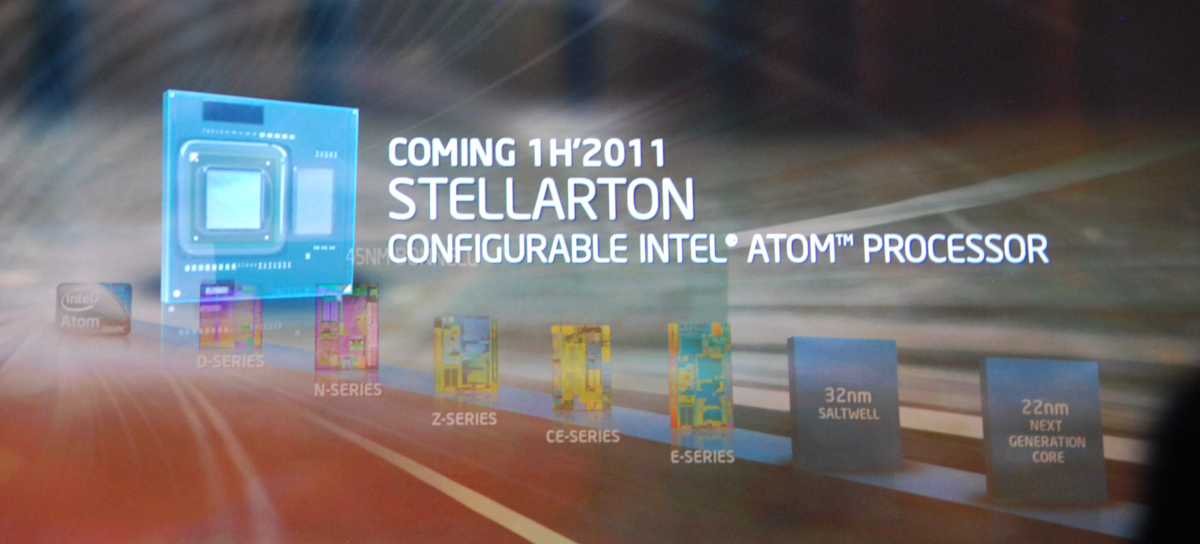
Stellarton Configurable Intel Atom Processor in 1H 2011
When designing a microprocessor you have two options. For very complex designs you have a bunch of engineers come up with an architecture. They then spend countless hours, days, months, eons designing it, and doing layout and performance optimization. Photolithographic masks are made and handed off to a fab that produces the silicon on wafers. This is a great approach for microprocessors that have high complexity, performance and volume demands. If you have a simpler design and want to get it to market cheaper, there's another option: a FPGA.

A field programmable gate array is exactly what it sounds like, a whole bunch of gates on a die that can be programmed in the field. An FPGA can be made to function like pretty much whatever microprocessor design you program it to be. You shave off the initial manufacturing costs as you don't need to make expensive masks. FPGAs are often used in emulating larger microprocessor designs.

As Intel tries to take the Atom into the embedded space it may run into some customers that want to pair Atom with custom hardware. Intel could simply make a version of Atom for every single market vertical, however that would incur a significant cost overhead. Instead, in the first half of 2011 Intel will introduce the Stellarton processor. It's a configurable Intel Atom processor with an on-package Altera FPGA.


Read more...

Neofonie WeTab: Preliminary Impressions of MeeGo

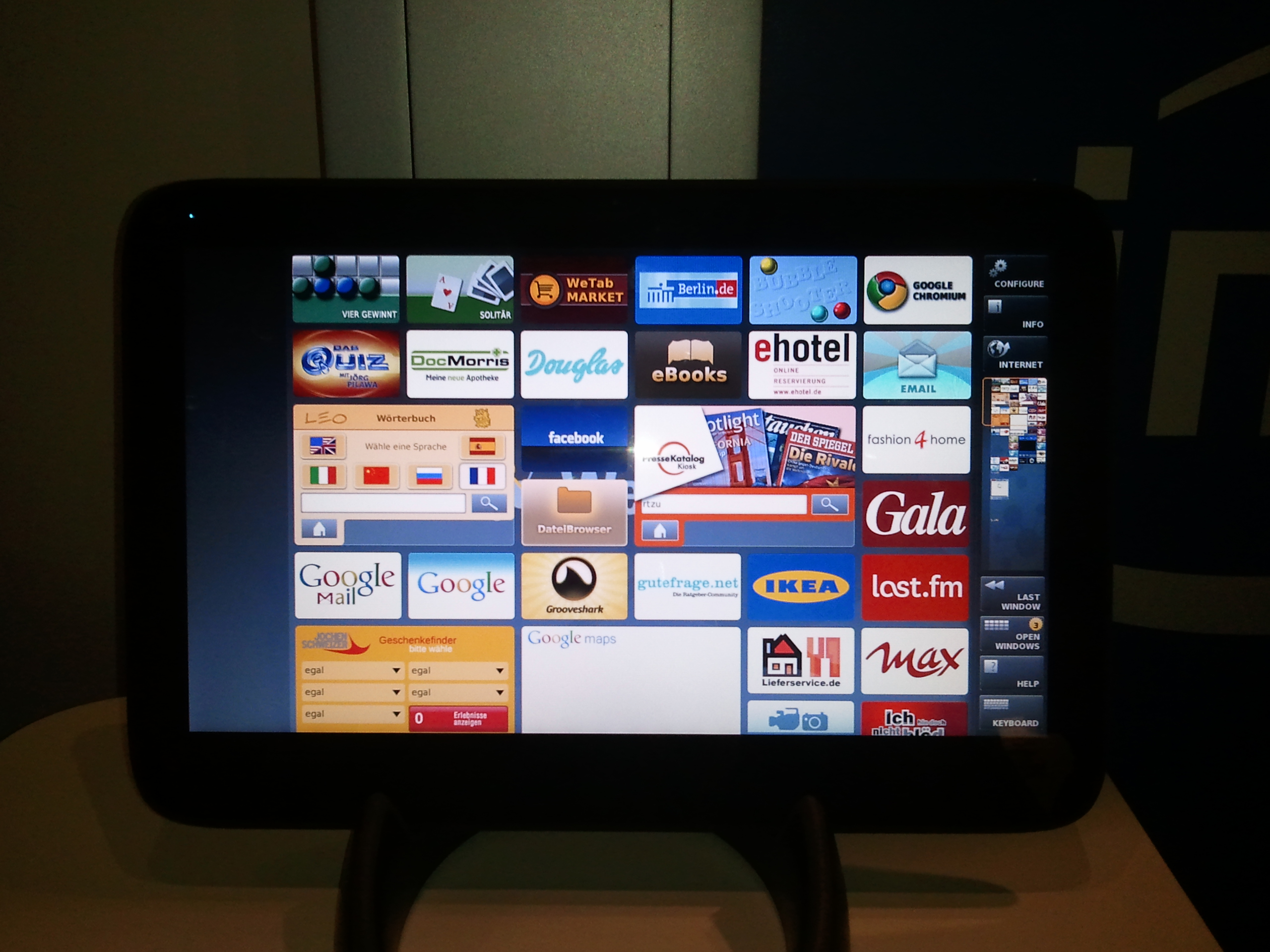
Out of Germany comes the WeTab, the first shipping MeeGo-based tablet, running Intel’s new open source operating system on top of the venerable Atom N450 processor. It’s a fairly standard Atom based tablet, pretty similar to the Exo PC and others, with the netbook internals, an SSD, and an 11.6” WXGA screen.


Neofonie’s skin on MeeGo consists of a number of tiles on the homescreen, and scrolls through the application tiles with a thumb-based navigation on the sides of the screen. All of the settings and controls are also located on the sidebars, making both navigation and changing options pretty simple. While it’s not the most intuitive UI to pick up immediately, once you get used to it, I can see it being pretty efficient to use. The keyboard is definitely better than the stock Windows 7 keyboard, but not quite iPad quality, since the keys are pretty small. Overall, the experience isn’t as impressive as some of the skinned Windows UIs like the ExoPC, but it’s quick and MeeGo is definitely noticeably more responsive than the Windows-based Atom tablets.

The claimed battery life of 6 hours suggests a 4 cell battery inside with around 32 Wh in capacity. Build quality is pretty good, with a solid chassis and a good feel in hand. At 1.8lbs, it’s a bit heavier than the iPad, but since it’s larger, you don’t feel it as much.

Unfortunately, the screen is a pretty big letdown on the WeTab. The 11.6” WXGA panel has a decent resolution, producing crisp images, but the viewing angles are pretty bad and the responsiveness was not very good. There were pretty frequent missed presses throughout our hands-on experience with the WeTab, and it really puts a downer on the otherwise decent UI. For a device that is shipping next week, that’s pretty disappointing, though it is possible that we were using an earlier prototype. If WeTab can figure out the touchscreen responsiveness, it could really push the MeeGo platform for tablets and carry the OS until the tablet-specific build of MeeGo is released early next year.


Read more...

First Public Demo of Oaktrail and Windows Gaming Tablet


Earlier this year Intel unveiled its Moorestown architecture, branded as the Atom Z600 series for smartphones and handhelds. Moorestown focused on a significant reduction in idle and active power, the former enabled by completely ditching the PCI bus. While this well for getting Atom into smartphones, the missing PCI bus means that you can't use Moorestown in Windows.

Intel made an alternate version of Moorestown to address this shortcoming. Oak Trail takes the Lincroft SoC (CPU + GPU + memory controller) and pairs it with a new PCH, codenamed Whitney Point. Whitney Point adds PCI support, enabling Windows support.

Just a few minutes ago Intel demonstrated its first Oak Trail platforms, both shipping in 2011. The first was a conventional looking tablet:

But the second was the OCS1 handheld Windows gaming device running Oaktrail. Intel didn't tell us much about the system but it has a sliding keyboard and a pair of d-pads.


Read more...

Saturday, September 25, 2010

NVIDIA Announces Parallel Nsight 1.5 & CUDA Toolkit 3.2


NVIDIA’s GPU Computing group has their own announcement this week ahead of their GPU Technology Conference next week.

Next week NVIDIA will be releasing the first major update to their GPGPU programming toolchain since the Fermi-based Tesla series launched earlier this year. Specifically, they will be releasing Parallel Nsight 1.5, and version 3.2 of the CUDA Toolkit.

Parallel Nsight 1.5

As we’ve reiterated a number of times now, NVIDIA’s long-term goals require the company to expand their GPU market beyond video cards and in to the High Performance Computing (HPC) space, where the brute force applied by GPUs for gaming purposes can be applied to academic, industrial, and even consumer computing applications. The Fermi architecture was a big step towards this goal, providing a GPU much better suited for GPU computing than the previous GT200/G80 thanks in large part to the GPU’s unified address space, ECC support, and support for C++. With the Fermi architecture NVIDIA would have the hardware necessary to take the next step in to GPU computing.

However good hardware requires good software, and that’s where our discussion is going today. With support for higher level languages comes the need for better programming tools and better debugging tools. Furthermore NVIDIA ultimately wants to extend practical GPU programming to the more rank & file programmers, where Microsoft’s Visual Studio is by far and wide the IDE of choice for C and C++. Reaching these programmers would require extending CUDA programming to the IDE and toolsets they already use, and in the process expand the market by making development more accessible than it was with older toolsets.


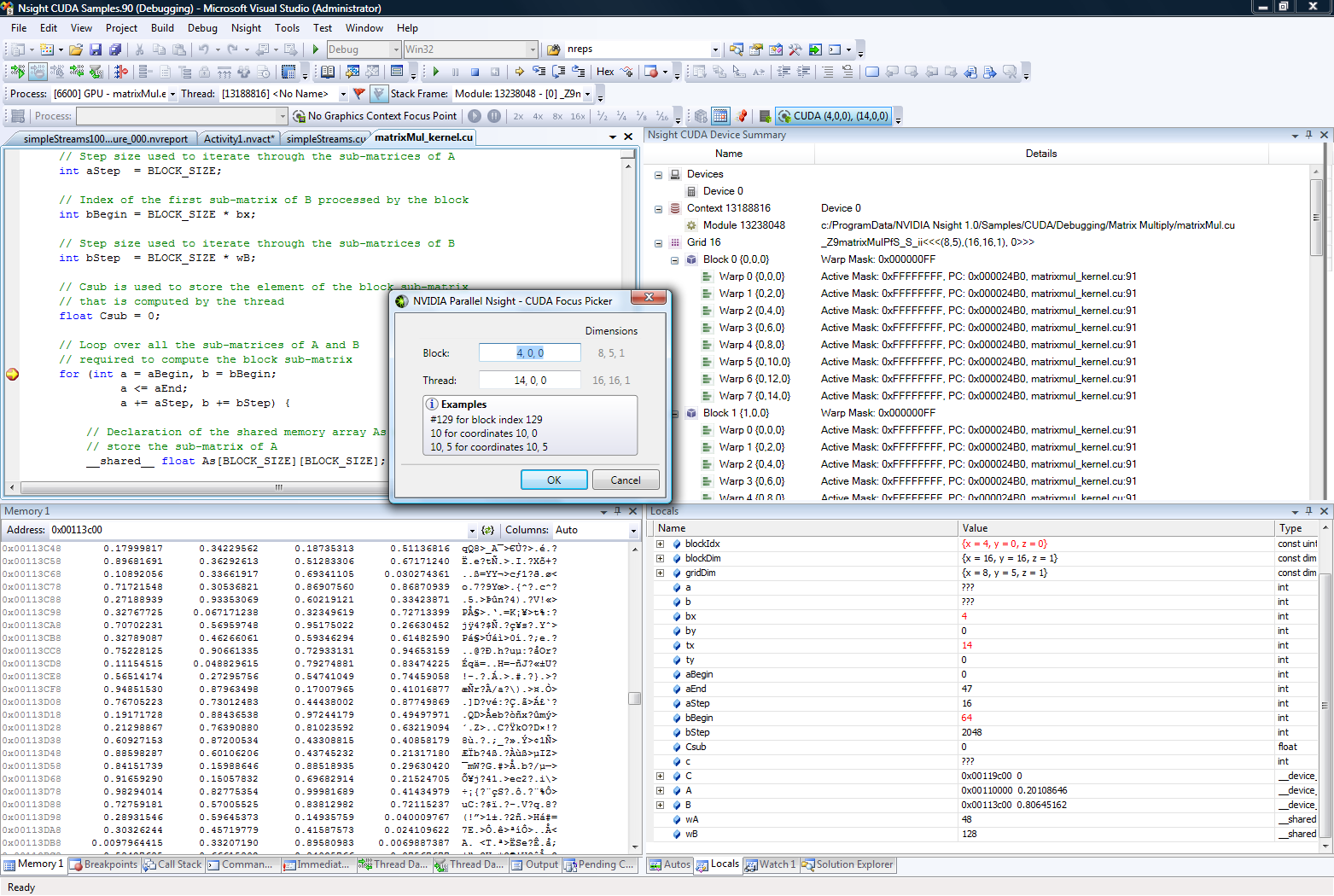
VS2008 with Parallel Nsight 1.0

In order to accomplish this goal, NVIDIA wrote a plugin for Visual Studio to enable the complete programming and debugging of CUDA and graphics code within Visual Studio – something that wasn’t previously possible – called Parallel Nsight. We first saw Parallel Nsight last year when Fermi was introduced under the name Nexus, and it finally shipped a few months ago along-side the first Fermi based Tesla cards. Since then roughly 8,000 developers have signed up to use the plugin.

On Wednesday the 22nd NVIDIA will be releasing the first major update to Parallel Nsight with release 1.5 of the plugin. Headlining this launch is the inclusion of Visual Studio 2010 support, bringing Parallel Nsight up to date with Microsoft’s IDE. Previously Parallel Nsight only supported VS 2008, which left Parallel Nsight behind as companies and developers began switching to Visual Studio 2010.

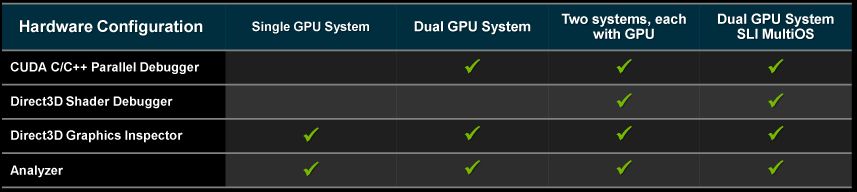
On the backend of things, Parallel Nsight 1.5 will be expanding the debugging capabilities of the plugin, particularly on single-system scenarios. Because the GPU needs to maintain the compute or graphics context being debugged, the only way to do debugging was to have a second system or a virtualized system to work with – one system to actually run the code, and a second system to debug from. While this is still (and likely always will be) the preferred method of debugging, it was impractical for single developers and smaller shops that couldn’t dedicate a second machine to the task.

For those programmers, Parallel Nsight 1.5 will be adding support for debugging compute code within a single system when multiple GPUs are present. This allows one GPU to run the application, and then a second GPU to actually drive the computer’s display. In this case the GPUs don’t even need to match so long as it's an NVIDIA GPU, allowing developers to use a high-end GPU for programming purposes while using a lesser GPU to drive the display, effectively halving the amount of hardware required for debugging. However at this time this single-system debugging support only applies to compute; shader debugging still requires a second system.


Parallel Nsight Debugging Configurations

The second big feature coming to Parallel Nsight 1.5 will be the addition of support for debugging code on a GPU running in Tesla Compute Cluster (TCC) mode. Since we don’t regularly cover Tesla news we haven’t had the opportunity to discuss TCC before, but in a nutshell TCC is a separate driver mode for Tesla cards that bypasses Windows’ control of a GPU through WDDM. WDDM, which was the new GPU driver model released with Windows Vista, was geared towards better integrating a GPU in to the OS by giving the OS more direct control of the GPU. The OS provided a virtual address space for video memory (including paging), recovery capabilities if the GPU hung, and enforced a coarse level of task scheduling on the GPU so that multiple processes could share a GPU without unnecessarily dragging a system down.

Compared to the old XPDM, WDDM was a big step up for GPU usage on Windows, but only for graphical purposes. With Windows’ iron-fisted control over the GPU and a focus on task scheduling for responsiveness over performance, it wasn’t ideal for GPGPU purposes. Case in point, with a WDDM driver NVIDIA was finding it took 30μs for a kernel to be launched, but if they had Windows treat the GPU as a generic device by using a Windows Driver Model (WDM) driver, that launch time dropped to 2.5μs. This coupled with the fact that a WDM driver is necessary to use Tesla cards in a Windows Remote Desktop Protocol environment (as any Folding @Home junkie can tell you, RDP sessions can’t access the GPU through WDDM) resulted in the birth of TCC mode.

Previously GPUs running in TCC modecould run applications, but the system functioned somewhat in a black box manner. In order to debug that code the GPU would need to be running with a regular WDDM driver, which had a performance impact and also meant it wasn’t possible to do this debugging in conjunction with an RDP session. With Parallel Nsight 1.5, it’s now possible to debug code on a GPU running in TCC mode, finally allowing developers to debug code against the same driver that the production version of the program would be running on.

The third major addition is support for profiling DirectCompute code when it’s used in conjunction with Direct3D. This is primarily a feature for game developers, who previously did not have an effective way to profile the performance of DirectCompute code in their games. DirectCompute has been underutilized in games so far, so perhaps this will expand its use.

Last but not least, Parallel Nsight 1.5 is also adding support for the new 3.2 version of the CUDA Toolkit

CUDA Toolkit 3.2

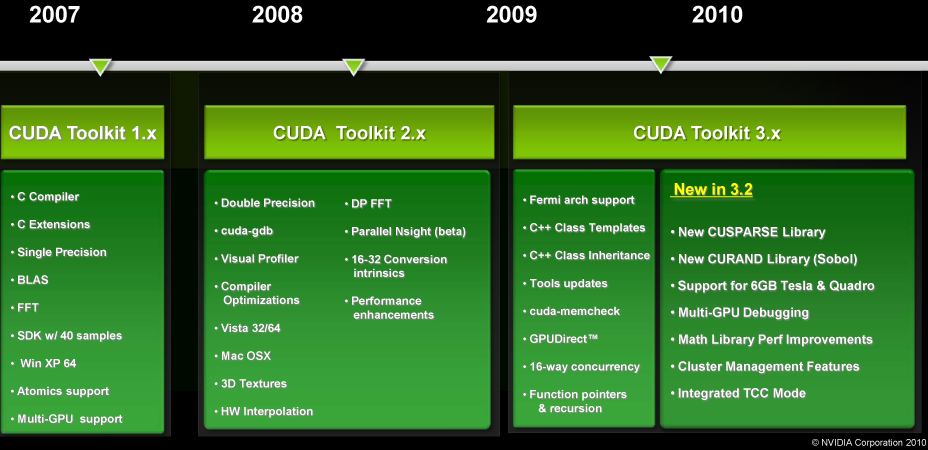
The CUDA toolkit is the agglomeration of all of NVIDIA’s programming tools: compilers, drivers, and libraries. Version 3.0 of the toolkit added support for the Fermi architecture and its unique features like C++, and version 3.2 will be the first major expansion of the toolkit since then.

A big focus for 3.2 is going to be on libraries. Libraries are a critical component for efficient GPU and CPU programming, as they provide hand-optimized implementations of common functions. Generally speaking, if you can hand something off to a library you can speed up that portion of the task significantly, and if the library can find a way to do something faster than before then it will also speed things up. For 3.2 NVIDIA is adding libraries for sparse matricies (CUSPARSE), H.264 encoding, and random number generation (CURAND), while also improving the performance of the existing math libraries such as the FFT and BLAS libraries.

The other big change will be the full realization of the 64bit address space of Fermi family Tesla cards. The hardware has been capable of addressing better than 32bits (4GB) of memory, but the software had not fully caught up. With the impending release of 2Gb GDDR5 RAM, 24 chip 6GB Tesla cards will be made possible, requiring the software to catch up. As of version 3.2 the toolkit (and Parallel Nsight) will be able to address these cards.

The 3.2 version of the toolkit largely goes hand-in-hand with Parallel Nsight 1.5, however at the moment it’s lagging behind Parallel Nsight by a bit. The release candidate of the toolkit will be ready shortly (likely at or before the Parallel Nsight 1.5 release) but the final version will not be ready until November.

All of these items will be on display next week, when NVIDIA hosts their annual GPU Technology Conference. We’ll be there for the later part of the conference to get a pulse on the state of GPGPU usage in consumer applications and to do some reconnaissance for future GPGPU articles, so stay tuned for our reporter’s notebook from GTC next week.


Read more...